What's new in Flet Studio
New features, improvements, and bug fixes in Flet Studio, listed in reverse-chronological order. Flet Studio ships independently of the Flet SDK — see Flet release notes for SDK changes.
November 5, 2026: Flet Studio 2.0
Studio 2.0 takes your app from the browser to your users: build it for every platform, sign it, and publish it to the stores, with nothing to install.
Build and publish
- Build for every platform in the cloud. Each platform has its own page under Manage › Publish: Android, iOS, Windows, macOS, Linux and Web. Every run shows its steps and logs as it goes, and Activity lists your runs by day. See Publishing.
- Android. Share an APK on a download page, or publish an app bundle to Google Play on any track. Studio makes the app's signing key and reminds you to back it up. Choose which phones an APK supports to keep it small. See Android apps and Publishing to Google Play.
- iOS. Connect App Store Connect once and Studio prepares the bundle ID, certificate and profile for you. Publish to TestFlight and the App Store, install Ad hoc builds on your own devices from an install link, and let testers register their iPhones from a link. See iOS apps.
- Windows. Each build makes a one-click setup.exe installer beside the portable .zip. Sign it with Azure Artifact Signing, and publish to the Microsoft Store. See Desktop apps and Microsoft Store.
- macOS. Create a Mac app as a .dmg, signed with your Developer ID and notarized by Apple, or publish to the Mac App Store and TestFlight for Mac.
- Linux and web. A .tar.gz for Linux, and a .zip of the web app to host anywhere. See Web apps.
- Store listings. Write your listing for Google Play, the App Store and the Microsoft Store in Studio, or ask the agent to write and translate it. Take store-sized screenshots from the Preview's devices, import an existing listing, and send it with a release or on its own. See Google Play store listing.
- Download pages. Every app gets one public page at get.flet.app with its latest Android, Windows, Mac and Linux builds, a QR code, and the visitor's system first. See Download page.
- Build settings without editing files. Each platform's Settings tab sets the
app's name, version, icon (any shape, previewed per platform), splash and boot
screens, permissions, deep linking and Python packages. Studio keeps them in
pyproject.toml. - Publishing accounts. Connect Google Play, App Store Connect, Microsoft Store and Azure Artifact Signing once in Settings › Publishing › Accounts and use them for all your apps. Keys and credentials are stored encrypted. See Signing keys and publishing accounts.
GitHub
- Sync an app with a GitHub repository. Changes you or the agent make in Studio are committed, with a message the agent writes, and pushes to the repository show up in Studio. Commits appear in Versions. See GitHub.
The agent
- The agent publishes too. Ask it to build or publish your app and it proposes a run as a card in the chat, which starts when you click it. It can also change build settings and fix a failed run (Ask AI to fix).
- Turns keep going when you leave. An agent turn continues if you close the tab or lose your connection, and you see it when you come back. Stop ends a turn with a summary of what it did.
- Long chats. Studio suggests starting fresh when a chat gets long, and New chat can carry a summary of the old one over.
- Screenshots can be taken on any Preview device, in portrait or landscape.
- No credits are charged when a turn fails because of the AI provider.
Plans and credits
- One credit balance for the agent and builds. Builds are charged by the minute while the build machine works on your app, with a 4-minute minimum. The composer shows one number: the credits you can spend.
- Try Creator free for 7 days, with every Creator feature and 500 bonus credits. A card is required, and cancelling during the trial costs nothing.
- Creator adds store publishing, code signing for Windows and macOS, GitHub sync, private apps, the Expert agent, 2 builds at a time and download pages kept for a year.
- Explorer now includes 500 credits a month (was 1,000), and can build for every platform and share download pages. To make up for it, every existing account gets 500 bonus credits, valid for 3 months. The Expert agent is on Creator only.
- Credit packs on every plan, Explorer included: $20 for 10,000 credits.
- Usage & billing (in Settings) shows your plan, when it renews, when your credits reset, and every payment.
- Retention. Agent chats are deleted after 30 days without use (90 days on Creator), starting November 19, 2026. Build logs are kept 30 days (1 year on Creator) and build files 7 days (90 days on Creator). See Pricing.
Studio
- A new app screen. Switch between Agent, Preview, Code and Manage, on desktop and on your phone.
- New Preview devices: Windows 11, macOS, Linux, Android phone and tablet, iPhone and iPad, besides Web.
- App thumbnails in your apps list and the Gallery, with grid and list views.
- Accent color: choose Pink, Blue or Neon green in Settings › Appearance.
- The code view shows an icon for each kind of file.
- Signing in on another device no longer signs you out on the first one.
- Status page: see whether Studio and its builds are running at status.flet.dev.
- Flet Studio now uses Flet 1.1.0.
- We updated the Terms of Service and the Privacy Policy for Studio 2.0.
September 29, 2026
- The agent sees the app it builds. While working on your request it can run the app in the Preview, read its Console and take a screenshot, so it catches and fixes errors in the same turn instead of waiting for you to report them. You see the Preview restart when it runs the app.
- Attach files to your messages. Add screenshots, images, PDFs, and text or code files with the paperclip, or paste a screenshot with Cmd+V (Ctrl+V on Windows and Linux). Images show as thumbnails, in the composer and in the conversation. Attachments work on the New app page too, so you can start an app from a mockup.
- The agent can put an attached file into your app — for example, "use this image as the logo" — and can save a screenshot of your app as a project file.
- Better-organized apps. New apps keep their code in a
srcfolder, Flet's standard layout, and split it into files by what they do instead of putting everything in onemodels.py. Small apps stay in a single file. New apps also come with logging set up, which the agent uses to debug. - The agent is better at layout, such as centering content or keeping a footer at the bottom of the page.
- When your app calls a web API, the agent writes code that works both in the
Preview and in the app you build with
flet build. - The Expert agent now runs on a newer model.
- Flet Studio now uses Flet 1.0.3.
- Fixed conversations that failed with an error on every message after a run was interrupted. Affected conversations recover on their own.
- Long tasks no longer stop partway because the agent made too many steps.
September 25, 2026
- Get more done with your AI credits. Recent model releases and lower model pricing let you do roughly 5–10 times more AI work with the same credits than before, depending on the task and agent tier.
- Choose between Pro and Expert AI agents in the message composer. Pro is available to everyone; Expert is available with a paid plan or an existing wallet credit balance. Studio remembers your selection.
- Creator now offers annual billing at $300/year — equivalent to $25/month, with two months free compared with monthly billing at $30/month. Plan AI credits still reset monthly when you pay annually.
- Manage your billing interval in the billing portal. Switching from monthly to annual billing is prorated; switching from annual to monthly billing takes effect at the end of your paid year.
- Creating private apps and making public apps private now requires the Creator plan. Existing private apps on Explorer keep working.
- On-demand AI credit top-ups are now available only on paid plans. Explorer users can continue spending wallet credits they already hold.
- Newly added wallet AI credits expire 12 months after they are added. Existing wallet credits remain non-expiring. Credits with the earliest expiry are spent first, and account settings show how many credits expire next and when.
- Credit-pack purchases now appear in the billing portal's invoice history.
September 15, 2026
- Flet Studio now uses Flet 1.0.0, including the updated API reference available to its AI agent. See the Flet 1.0 announcement for what's new in the SDK.
- Refreshed Flet and Flet Studio logos for light and dark themes.
- The agent creates app icons at 1024 × 1024 or larger and has updated guidance for Flet 1.0's icon generation: one source image for all platforms, transparent backgrounds, and platform-appropriate framing and background colors.
- Fixed an extra blank app being created when the app-creation action replayed after signing in. Also fixed a race that could lose that action when the sign-in dialog closed.
August 26, 2026
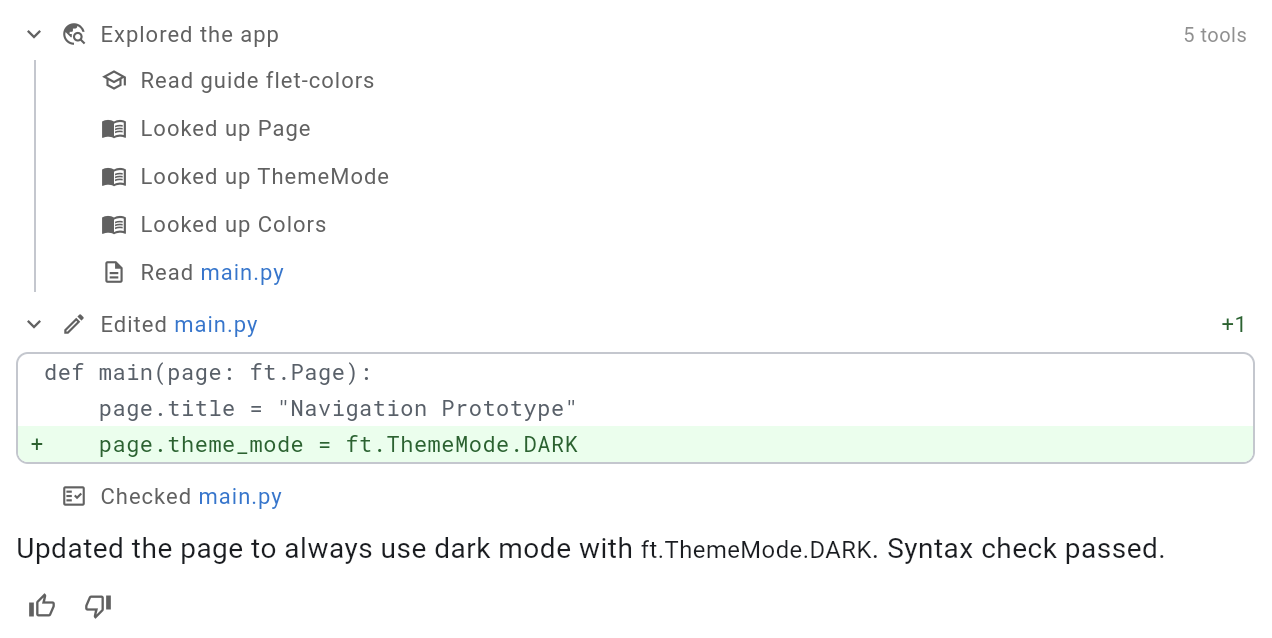
- The agent's activity list is much quieter. Lookups — API references, icon searches, file reads — now fold into a single expandable row, so what the agent changed stands out from what it merely read along the way. Expand any row to see every call it made.
- File edits show an inline diff with added and removed line counts, so you can see exactly what changed without opening the file.
- File names in the activity list are links — click one to open it in the editor.
- Clearer wording and a distinct icon for every tool the agent uses.
- Fixed an error that could stop a run when you sent a follow-up message in a long conversation.
- Your unsaved edits are no longer overwritten when the agent changes the same file you're typing in.
July 14, 2026
- New AI agent that helps you build and modify Flet apps with natural-language instructions.
- Paid Creator plan and AI credit packs, with billing powered by Stripe.
- Flet Studio newsletter — manage your subscription in account settings.
- Updated Terms of Service and Privacy Policy to cover AI features, paid plans, and the newsletter.
May 29, 2026
- New sign in options: Google and Microsoft.
May 26, 2026
- The initial public release of Flet Studio.